Monday, 26 July 2021

Instagram on my PC

Have you ever been frustrated that you can't post pictures to your Instagram account from your PC? 

Yes!  I rarely use my iPhone for posting and I might use my iPad to share a photo, only because it is so much bigger!  What I would really like to do is to post from my desktop or laptop computers.  And, lo and behold, it can be done!  I love YouTube tutorials!  I will save you precious time by sharing the secret of how to do this!

Step 1

Open your browser (Chrome) to www.instagram.com. Log in.

Step 2

Right click anywhere on the screen and select Inspect at the bottom of the options that pop up.  
"Ctrl+Shift+I" will do the same.

Step 3

The Toggle Device Tool Bar at the top is what you want to see. (Ctrl+Shift_M).
Click the phone/tablet option.   

Step 4

Now you see the phone view.  Select your model at the top.  I have the iPhone X.  

 
Step 5

Refresh your browser!  That's it!  You will now see the  +  at the bottom and middle on your phone view, which you normally don't have access to on your computer. You will be using a grey, fuzzy, round cursor to operate it, but it works.  That was all I needed to know.  Leave me a comment if you got this to work!  


I love this!  

I Love Sharing!

You might also like my FREE "Fonts - How to Add New Fonts" to PowerPoint instructions.


Thanks for visiting my blog.  

Find me on Instagram and check out my other links at the top of the page.  Have a great day!  


Thursday, 22 July 2021

TpT Forward 2021 - Simply WOW!

I am blown away!  This year's TpT Forward conference is/was amazing.  I say "is" because I am still working my way through it! I want to see it all!  

I should tell you, I did the TpT Forward conference in 2020, but was so overwhelmed by the end I was just frozen. I truly have not done anything, other than have ideas, but I just could not bring myself to act, in any capacity. It was a truly terrible year for teachers, inventing teaching from home via Zoom, to hybrid models, etc. I did return to the classroom as a teacher teaching on call (TTOC) but in a very limited capacity. I took my health very seriously, and even managed to lose 65 pounds! That was MY big WIN! 

Fast forward to TpT Forward 2021.  I am taking the conference in smaller increments - only a few each day.  I have reconfigured my office with the two-monitor model, and I must say, I like it!  

I am mastering Airtable!  I am able to import the TpT stats with the click of a button!  If you haven't tried it, here is a link: Airtable.com.  It is so far beyond a spreadsheet, and free! 

I also learned more tips from Chandra Martin (TpT - Teacher Game Room) about PowerPoint.  I was pretty proficient before, but she had a few tips and tricks I did not know. 

I am also confident that I can now convert my PowerPoint presentations and PDFs into Google slides and TpT Easel products. I am motivated to create better products for teachers.  

Even though it is summer, and I have put new batteries into my motorhome, ($740!) I am deciding to stay home.  We have fires all around us here in B.C. and my piece of the province is considered under a state of emergency.  I am safe, but can see smoke and flames in the hills to the east of me from my livingroom window. The show of helicopters lifting "bags" of water at the airport is mesmerizing, all from the comfort of my home. I took in displaced evacuees while the evacuation orders where implemented. What a crazy year 2020-21 has been.  


What I would like to tell you is that I am putting my entire store on sale for two days, before I update my products and potentially increase my prices, as was recommended at the conference. Know that once you own a product, and changes and/or improvements are made, you simply download the newest version. Score!  If you have a wish list of products you would like to see improved or changed, please drop me a line via artskillsforlife@gmail.com.  I am truly in a working head space, finally!  Click the image to go to my store.     

Remember to work smarter, not harder.  Have a great summer!   


Saturday, 13 January 2018

Kindness Starts Where?

Being a Teacher Teaching on Call (TTOC) I get to see a lot of different classrooms, students, teaching styles, lessons, and so on.  The best part of my job is coming home with something wonderful. I am easily impressed when I see teachers preparing their students to become global, kind citizens. The lessons presented, the discussions, the actions taken - it all sinks in. 

This week was great!  I taught from Kindergarten to grade seven.  The little ones played nicely together at their chosen centres.  I didn't have to break up one squabble!  They have already learned to care and share.  I was impressed!
The older classroom read a short passage, almost like a blog post, and were then prompted to write about it.  Mr. Browne's Precepts, by R.J. Palacio. I'd never heard of it, but it was great, full of daily quotes, which I love! At the end of the day I picked up the book and found that it was by the author of Wonder, which I have not read but have heard of as it is now a movie with well known actors. To have a discussion ranging from baboons to children about bullying, aggressive behaviour, and how a change in attitude can change the future was powerful. 

There is a kindness initiative in the school and it is working!  The principal came in and shared how they had just witnessed the kindness of older students helping younger students getting out of their wet, snowsuits. It makes a difference in all their lives, and is greatly appreciated. This kindness initiative is seen and felt everyday, by everyone. It is the only school where the students, regardless of which class I am in, thank me for being their teacher that day. They thank ME!  Do I feel appreciated?  Yes, I do.  It warms my heart.  And yes, I love working there, as an On-Call teacher.     
And do I thank them for being amazing students, especially towards a TTOC?  Absolutely! 

Kindness, keep it going!

Thursday, 7 September 2017

The "C" Word

I don't think there is anyone who hasn't been affected by cancer, either directly or indirectly.  I lost a teaching colleague, just shy of her retirement, to colon cancer.  She taught in the classroom next to mine, and we spent a lot of time together.  I then lost a family member within six weeks of diagnosis.  She also worked in the school system.  I was quite aware of how these deaths affected me, but then I got to thinking about how students would be affected.  Illness and death are part of life, but to our students, these topics can be overwhelming.  I think we need to have a real discussion with them, even at a young age.

I developed a three page unit for a class to discuss cancer.  They may have a family member affected, or there may be someone at your school that is going through this terrible fight, or worse yet, someone in your class.  These scenarios are an opportunity to bring discussion to the entire class.  Students need to understand the importance of empathy and moral support in learning to cope with illness and disease.  


I am blessed with good health, so far, but I lost my parents almost twenty years ago and my younger brother three years ago, all to medical conditions. Cancer is not fair in who it picks a fight with. I hope the sale of this lesson, with 50% being donated to cancer research, will help find a cure one day. I have seen survivors win this fight! I want to see cancer gone!  Please share the link and spread the word.

Stay healthy my friends.  With thanks,

Doris  

Monday, 29 May 2017

Animation anyone?

I have had the good fortune to teach two blocks of animation to grade 9 and 10s this semester.  I love teaching courses where it is easy to motivate and inspire students to be creative and imaginative.  Do I get any credit?  Maybe . . .

I give credit to the district in supplying us with high end programs to create our animations, and some of my students have taken on the self-directed approach to learning how to use these.  We were also supported with a dozen Wacom tablets.  The learning curve is steep, but students are sticking with it and getting results.

I also like to offer students a way to continue doing animation at home, without having to purchase expensive programs.  My recommendations?  Microsoft PowerPoint and Windows Movie Maker.  Yes, these old standbys work wonders!  I have to say that Movie Maker 12 is better than the newest version for Windows 10, as it reads the MP4 files that PowerPoint creates, which the newest version does not.  You may need to convert them if you don't have a compatible match.  

I have ten assignments I give the students, and the majority of class time is spent working on their projects.  Starting with a logo, intro and outro sets the stage for how animation works.  I have selected a set of fifteen one minute videos created by animation students at the National Film Board (NFB), called Hot House which has eight seasons.

I was fortunate to have a teacher in my high school days (in the 1970s) who introducted me to Norman McLaren and the National Film Board.  Mr. Sparks brought in the films on reels, and it took weeks for them to arrive.  Luckily we can now show these directly at the NFB website or on YouTube.  Did you know that Norman McLaren won an Oscar for "Neighbours" in 1953, a stop animation classic?

On a more modern angle, I bring recognition to animation that we see everyday, without even thinking about it - on TV commercials, at Tim Hortons (or other fast food outlets) on their moving menu boards, on facebook, etc.  Animation is everywhere, and students could be doing it as a job!  One of my former students now does the animation on the Global BC morning news in Vancouver.  I know he does a great job as I watch the news each morning before I head to school.  I hope more of my students carry on their animation ambitions.

I have created a YouTube channel to share the efforts of my students publicly, with permission, of course.  Please have a look and leave my students some encourging words.  More entries will be added in the next four weeks, so please subscribe so you can see the projects as they are added.

I have created a preview for my TpT product:
If you find this interesting, please carry on to the product


Thank You!  


Sunday, 2 April 2017

Video Intro

The more I learn, the more I need to do!  I just completed another course and have created a video introduction for my future video posts to YouTube.  


How did five seconds take all day to do? I certainly learned some new skills, and am rather happy with the results.  PowerPoint rocks!  It is quickly becoming my favourite editing tool.

Wednesday, 29 March 2017

Product Previews

I thought I was pretty tech saavy, as I wrote in the TpT forum of how I make my previews.  I was gently told that what I was creating were thumbnails, not previews.  She was right!

And with that, I have promptly created my first video preview.  I already see a few improvements I could make, but as my first attempt, I think it worked out well enough.  Now I have a YouTube Channel!


Monday, 20 March 2017

URL Building

There is SO much to learn!

On my TpT journey, it started with creating products (lessons).
Then came the creation of a blog, facebook page, twitter account, instagram, pinterest . . . and so on!
These often seem like a time consuming exercises, but as driving viewers (potential customers) to your TpT store is the goal, it is a necessary exercise.

My latest learning curve includes the creation of URL and UTM codes.  Have I lost you yet?  I'm getting there!  Tomorrow night is the TpT Webinar about UTM codes, so I've poured myself into it for the last week to get a better understanding of it, and so I would be part of the conversation.  I am also taking a UDEMY digital marketing course, and I have certainly gained some valuable insight about how to do many new things. More to come on that topic when I'm done the course.

So, the URL is the web address of your product, blog, site, etc.  This is pretty straight forward, and often very long!  For example:  https://www.teacherspayteachers.com/Product/Interactive-Puzzles-Hummingbird-3070919  There are URL shorteners, such as Bitly.com and Goo.gl which will shorten your URL, for example, bitly.com created http://bit.ly/2nuHzHA, and goo.gl created https://goo.gl/rc7sws.  Both links will direct you to the TpT website, where hopefully someone will want to buy it for classroom or personal use.  That is part one.

If you go back to the bitly.com page, you will see statistics - how many clicks and where they came from.  They more bitly URL codes, the more data you will receive.

The easiest QR Reader app I have found is this one.  I use it on my iPhone and iPad, and it works like a charm.

From the goo.gl page, you will also see statistics - clicks, browsers, platforms and countries.  It will also create a QR code for the link:
 

The easiest QR Reader app I have found is this one.  I use it on my iPhone and iPad, and it works like a charm. So far so good?  If you have it, try the QR Code above and see what happens.    

Now comes the TpT URL code builder. Start here. This will explain what it is all about. Once you've done that, go here.   

I created a spreadsheet to keep track of all the various codes, as there will be a different one for Pinterest (no shortened codes work here),Twitter, Facebook, BlogSpot, and so on.  It looks something like this:  
This takes me the better part of the evening to complete and then post to each site.  Tonight, this blog is taking up the most time, but I feel it important to share what I am learning, as many TpT authors have been very generous with me.  

When I go to my TpT Dashboard, and view Traffic, I can see where the clicks came from, very specifically, such as Pinterest, facebook, etc.  My digital marketing course is telling me that this information is very valuable.  It will tell me where I need to spend the most time with promotion as the traffic is driven from very specific places.  

I often go to http://tpt.naujok.com to see my own TpT growth.  Check out your own TpT store here.  I have personal goals of where I want to be with my store, and the growth curve keeps me motivated.  I am coming up to my second anniversary as a TpT seller and am very happy with how things are going.  

What I am learning will be useful for the TpT marketing, but also for the two web-sites I manage for others.  It has been worth my time and trouble and I hope I have laid this out for others to follow and understand.  Please feel free to share a link to this blog if you think it was useful.  

Thanks,

Doris 


Friday, 17 March 2017

Interactive Puzzles

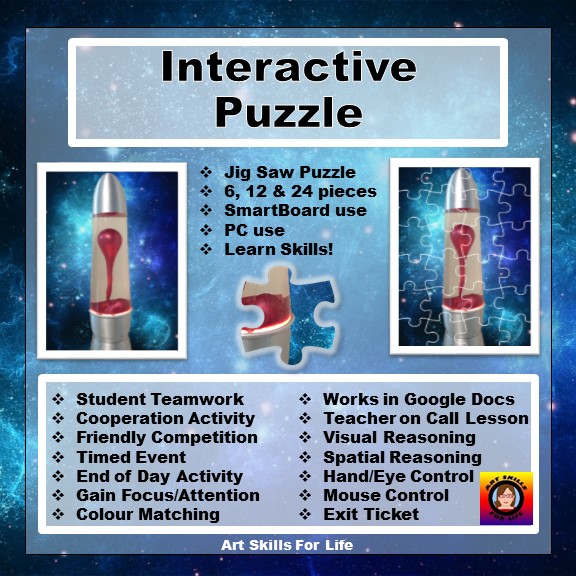
My PhotoShop assignment for students turned into something completely different!  I think this is the TpT product that will reach from Kindergarten to High School.  And yes, I have that lava lamp in my classroom!  Students love it!  This is a FREE download, so please try it now!  If teachers give me feedback that says it is useful, I will certainly be making more.


Wednesday, 15 March 2017

Custom TpT Categories

I have been asked how I created my emoji icons in my custom categories list.  Here's how!


Go to the My Product Listings page from your dashboard.  See mine: Custom Categories

Select Manage Your Categories at the bottom of the list.  The edit view is this:


Go to your emoji keyboard, on your iPad, and try some out.  Once you commit, you will see if it worked or not by seeing the saved visual after you click.   
If it did not, the category will be empty of all text, but still indicate how many projects are in the category.  I suggest only changing one category at a time!  

This will require some trial and error time, as some emojis do not work. 

I hope this helps!  Thanks for checking in, and check out a category which may be useful to you while you are at it!  

All the best in customizing your page!   

Tuesday, 17 January 2017

TPT Featured Author - Me!

Advertising Works!  

This TpT newsletter feature has resulted in breaking my best month's sales record, has added many new followers, has moved me up almost 1000 spots in TpT ranking, and it is only the middle of January!  The bigger change is that I am inspired again!  I have already created two new items and am working hard on a very comprehensive course presentation, which I may be teaching for semester two! I should know by the end of this week. I hope it all falls into place.  So much for retirement!

TPT Newsletter #392
One month

These graphs are created by The Colorado Classroom, and allows viewers to see their own stats, and those of other TpT stores.  I check here frequently!  I learn so much here!  If you like this link, do let Brittany know you where there!
One year
I became a premier seller in April 2015, and my store growth has been steady, but I see how promotion is crucial to growth.  Even though I have a facebook page, Twitter, InstagramWordPress, Blogger, Pinterest, and Google+, I have not utilized these very well, at all!  Looking at the TpT traffic stats they lead me to believe most views are directly from TpT, with Pinterest a distant second and Facebook third.  So, where should I devote my time?  I still think it is in creating new lessons.  I enjoy that much more than posting, here, there and everywhere.  I don't know how some sellers do it all!  Anyway, slow and steady is how I work, and so, I will happily carry on.  Sales and feedback tell me I am doing something good.  Yeah!    


Canada 150

I am so excited about Canada turning 150 years young!  I have already ordered my free Park Pass and will visit Haida Gwaii this summer!  I am SO EXCITED!  This is a bucket list item for me!  My camera will record every amazing scene.

What an amazing history Canada has had so far.  I started to research the Canada 150 website and found that much of it had to do with our National Parks.  I spent a week researching, reading, making notes, and then finally putting it all into a Word Search and an Internet Search document with the package called  Canada 150.  I have priced it at 150 cents!  Get it?  Clever?


I still want to add Park Birds and Mammals sections, as some are identified as being at risk.  This form of learning is important for our children to understand the purpose of our parks and what is at stake if we don't manage it; they will be the protectors of this great land in the future.

I certainly enjoyed making this, but I enjoyed learning about my country even more.  Did you know that the National Parks cover only 3% of our country's land mass?  The worksheet will ask you things you will find interesting, once you look up the answer!  This is great Canadian trivia you can impress your friends with!  Enjoy!  

Sunday, 15 January 2017

2017

Happy New Year!  Do you have a New Year's resolution?  I do . . .

I have not be very good at writing a blog; terrible, in fact.  I spend SO much time on the computer, it really is nearing addiction level.  Between TpT, Facebook, Twitter, Pinterest, and a Blog, I just can't do it all!  Did I forget one?  Oh yes, Instagram!  That one I'm even worse at!

And so January started with Teacher Pay Teachers putting me as the feature Teacher-Author in their newsletter!  How exciting!

Well, talk about renewed energy and inspiration!  I've already added two new products, reached record sales (and am only halfway through January!), and have new followers.  I needed this!  Spring cleaning will have to wait!  

I promise I will try harder with my blog!  Will bloglovin help?

Thanks!

<a href="https://www.bloglovin.com/blog/18438659/?claim=yzw5esc7wgc">Follow my blog with Bloglovin</a>

Sunday, 1 May 2016

Kahoot!

KAHOOT!  How had I not heard of this amazing teaching tool? 

https://getkahoot.com/

I observed a student teacher using this with his class to review for a final exam in his course.  It was brilliant!  Students follow along with their cell phones, or iPads, and answer questions by selecting the correct answer for each question.  Kahoot! tracks every participant's results.  The teacher knows how well students know the material and can take time to reinforce learning.

Later that day, I went to the Kahoot! web-site and tried a few.  If you search the database, there are SO MANY files already in place in a huge range of TOPICS.  It is quite impressive.  Just be sure to remember your login name and password.

I then went to the TpT web-site to see if teacher-authors had Kahoot! lessons.  Yes, indeed, they do.  Some are designed to explain how to use Kahoot! while others are linked to specific Kahoot! lessons.

I was then curious about the terms and conditions of Kahoot!, as it states clearly that it is FREE!  I sent them an email asking about it.  Here is the response:

Thanks for reaching out about this.
Per our Terms and Conditions, "Attempting to copy, duplicate, reproduce, sell, trade, or resell our Resources is strictly prohibited."
Also, "any content posted by you using any open communication tools on our website, provided that it doesn't violate or infringe on any 3rd party copyrights or trademarks, becomes the property of Kahoot! AS"
With those statements, selling access to specific kahoots is a violation.
I hope that helps! Let me know if there are any other questions.
Happy Kahoot!'ing!Bryan
So, now we know.  Use, make, share, but don't break copyright.  It really is a great resource for teachers.  I recommend it!  

Thursday, 3 March 2016

Emily Carr

March 2, 1945 Emily Carr passed away in Victoria.
I just finished reading my second book, this one by Doris Shadbolt, about Emily Carr last week.  Because Emily wrote journals, which were published, many of her thoughts are repeated in the writings of others, myself included. https://www.teacherspayteachers.com/Product/Emily-Carr-Quotes-2084798  I so admire her.  If you've never read her writing, or seen her art, please do so. She was an original.

This CBC article is a great introduction:
http://www.cbc.ca/beta/arts/late-bloomer-emily-carr-paintings-group-of-seven-interview-1.3465841

Emily Carr lives on!


Wednesday, 17 February 2016

Ted Talk - Communication

Do you show Ted Talks in your classroom?  I have and do.  Today I watched Celeste Headlee talk about communication.   She was spot on. I'd recommend this to high school students.  Follow the link.
Check out this amazing TED Talk:
10 ways to have a better conversation
https://www.ted.com/talks/celeste_headlee_10_ways_to_have_a_better_conversation

I could see a great writing assignment to follow this up. 

Thursday, 11 February 2016

Happy Birthday to Me!

Today I finally saw MY Logo on the TpT home page advertising Teacher-Authors.  One year ago today was my first sale with TpT and tomorrow is my actual birthday.  It feels like I received a present!  I am celebrating!
I feel very blessed to do what I do and to know that what I have to share is appreciated and wanted.  
I am putting my ENTIRE STORE ON SALE for 24 hours in celebration!  Please come share in the party!  Happy Birthday to me!  

Tuesday, 9 February 2016

Winter Be Gone!

Today was proof that the groundhog may have gotten it right.  Frosted car windows, fog on the road, and chilly fingers means spring is not quite here yet.

Today I thought I'd share my little trick for teachers needing to defrost their car windows in a hurry.  I have never been late for school, but I did burn out my wiper blade motor because the blades were frozen to the window.  EXPENSIVE LESSON!

 
Forget the scraper and don't turn on the wipers to use the antifreeze de-icer.  If your blades are frozen, it will be the beginning of the end.

Simply put the antifreeze de-icer in a squirt bottle and spritz your window.  Wait only a few minutes, and presto, the blades will move freely and the ice will be melting in a hurry.  


Truly, I don't scrape any windows anymore, ever.  Why did it take me so long to figure this one out?  Not sure, but I think it is pretty clever.  Feel free to share.  

This was my drive to school today.  The fog didn't lift for hours.  I had a good day today.  Did you?


Oh Georgia!

Georgia O'Keeffe - American Artist.  What's not to love about her art?  I usually include a painting assignment based on her enlarged flowers in my senior art curriculum, which my students have completed with great success.  I used to show them an hour long DVD, trying to include art history into my lesson.  The information was great for me, but too long for my students.  I have since changed how I introduce Georgia to my students.  The key to art history is to keep it short, visual, and interesting.  More information is not necessarily better.

The Georgia O'Keeffe Museum has a great introductory video for students, and is under fifteen minutes long.  I keep my longer DVD for students who want more, but most are satisfied with a base knowledge.

When teaching art history, I have come up with a plan that seems to work.  I create a teacher cheat sheet of twenty facts students should know about a particular artist.  I find facts that are unique to each artist and choose specific details that have a "that's interesting" factor.  I also try to include things that are not necessarily on the video.

I'll be the first to admit that I didn't like history in school, and my university art history course was no exception. There was just too much to learn and memorizing names and dates wasn't my thing.  But, give me interesting facts and tidbits of trivia, and I have a better chance to remembering something.  And so I began a very long quest on how to introduce art history to my students.  I think I got it!

Creating a word search is great for reviewing vocabulary and terminology, but if you don't know what the purpose or context of those words are, then I believe a learning opportunity has been missed.  I now pair the word search with a Q and A sheet, using the same vocabulary.  The question and answer sheet may involve either listening skills, as I may have verbally given them the details of the artist, or students may have to find the answers on-line.  This pairing of information is ideal for reinforcing what I want my students to learn.

I have created just such a pairing of a Word Search with a Q and A sheet for Georgia O'Keeffe. Let me tease you with five facts:

  1. How many paintings did Georgia do in her lifetime?
  2. How old was she when she went river rafting down the Colorado River?
  3. How much did her painting "Jimson Weed" sell at auction for in 2014?
  4. How did Georgia O'Keeffe stay cool in the hot New Mexico desert?
  5. How old was she when she knew and declared she would be an artist?    

So, do you know the answers to these?
 Georgia O'Keeffe - American Artist

Answers:

  1. Georgia O'Keeffe painting over 900 paintings!
  2. She was in her seventies when she went river rafting down the Colorado River in 1961.
  3. "Jimson Weed" sold for $44,405,000 at auction in 2014.
  4. Georgia used to lie under her Model A Ford car to keep out of the hot sun.
  5. At age ten Georgia declared she would be an artist.
Georgia O'Keeffe was a true artist, dedicating her life to expressing what she loved.  She would leave her husband for months at a time so she could paint without interruption.  Her body of work is impressive and worthy of study and admiration.  Every art student should be exposed to Georgia's work.  Google search her images, put up a slide show on your smart board, teach colour blending, and let the painting begin!